
ButterflyMX
ButterflyMX, IncProductivity
4.81.16K Reviews
- Version
- 1.64.0
- Installs
- 500.00K
- Age Rating
- Everyone
Screenshots
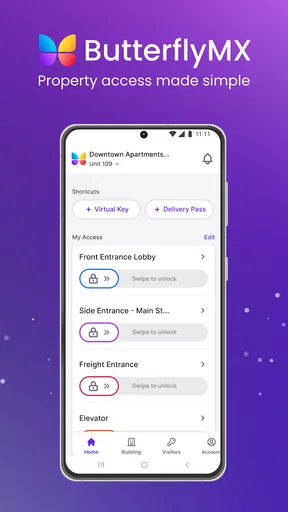
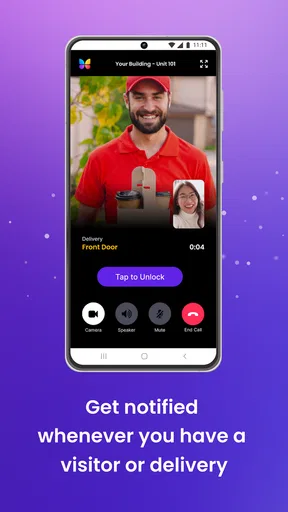
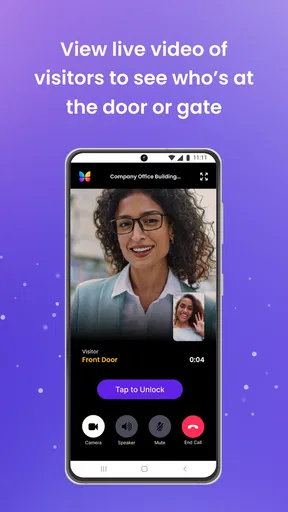
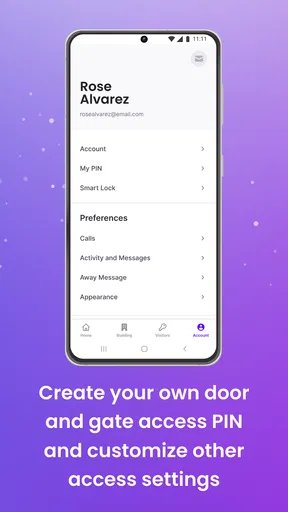
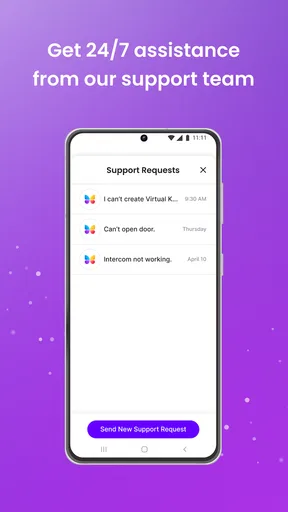
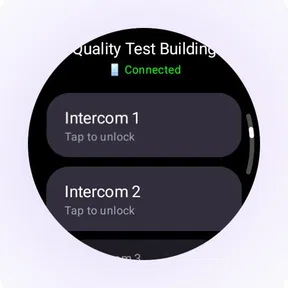
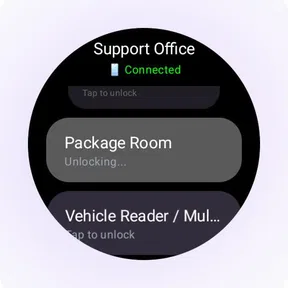
Our Review of ButterflyMX
 Analysis by Appyee
Apartment access becomes frustrating when a simple arrival turns into a search for keys, a call to a resident, or a wait beside a locked entrance. ButterflyMX is built around removing that repeated interruption. I reviewed it as a productivity app for property access, and my overall impression is that it is most useful when your building already uses the ButterflyMX access system. In that situation, the app puts entry-related tasks in one place instead of making residents depend on a physical key or a separate conversation every time someone needs to get inside.
The idea is easy to understand, but the value is practical rather than flashy. You are not installing another general-purpose organizer or messaging tool. You are using a dedicated companion from ButterflyMX, Inc to interact with an access arrangement connected to your home or building. That distinction matters: the app can make an existing ButterflyMX setup much more convenient, but it is not a universal replacement for every intercom, lock, or building-management system.
It is free to install and suitable for Everyone, which makes it approachable for households with different levels of technical confidence. The app has been available since September 25, 2013, and the current release is version 1.64.0. Its average rating is 4.8 from roughly seventeen thousand ratings, with about one point two thousand written reviews, and it has passed half a million installs. Those figures suggest that it is established enough to be familiar to many residents, although the quality of your experience still depends heavily on how your own property has configured access.
Where ButterflyMX earns its place
I find the strongest case for ButterflyMX is not simply replacing a key, but making routine entry decisions easier to handle deliberately. In this section, I look at the situations where that focused role can genuinely help, while keeping in view that the experience depends on your building’s own setup. The next part considers how that trust context shapes everyday use.
The recurring access problem it solves
The most convincing reason to use ButterflyMX is repetition. A single awkward entry is tolerable; the same awkward entry several times a week becomes a small tax on your day. You may arrive with groceries, return while carrying a child, receive a delivery while working, or need to let in a guest when you are not standing near the entrance. The app is intended to reduce those moments of searching, waiting, and explaining.
In my view, the best way to judge it is not by how many screens it has, but by whether it shortens the path between “I need access” and “the access problem is handled.” A focused access app has an advantage over improvised alternatives because it keeps the relevant action close at hand. You do not need to turn a building-entry request into a long text exchange or rely on someone remembering where a spare key is.
That convenience is especially noticeable for residents who regularly coordinate with other people. A household may have different schedules, visitors may arrive while the resident is away, and deliveries rarely respect the neat timing we imagine when placing an order. ButterflyMX makes sense when access is not only about opening a door for yourself but also about managing the practical interruptions surrounding that door.
There is an important boundary, however. This is not an app I would recommend simply because someone wants a smarter way to organize keys. It is tied to a participating ButterflyMX environment. If your building uses another intercom or access platform, installing it will not magically connect the two. Before spending time setting it up, I would first confirm that your property supports ButterflyMX and that your resident account is ready to use.
Getting to the first useful setup
The first setup should be approached as an access task, not as casual app browsing. Install the app, sign in or create the account associated with your residence, and make sure the building information and resident details match what your property has on file. If the account connection is not recognized, repeatedly reinstalling the app is unlikely to solve the underlying issue; the more useful next step is checking the invitation or registration process with the building’s management.
I also recommend completing the setup before you actually need to enter the building. Testing the app during a calm moment gives you time to understand where the main access controls are and whether your phone behaves as expected. The worst time to learn an access workflow is while standing outside in bad weather, carrying bags, or trying to coordinate with a waiting guest.
Keep the app easy to reach on your phone. This sounds obvious, but access tools lose much of their benefit when they are buried in a crowded folder. I would place it somewhere visible and review the app after an update rather than assuming every control will look exactly the same. Version 1.64.0 is the current version, and keeping an access app current is sensible because reliability matters more here than novelty.
A useful preparation habit is to decide what you will do if the phone is unavailable. A dead battery, a damaged device, or a poor connection can turn any phone-based access method into a problem. I would not treat ButterflyMX as the only contingency for an important arrival. Keep whatever backup arrangement your property provides available, especially if you are responsible for a child, an older relative, or a guest who cannot easily wait outside.
Everyday situations where it saves time
Imagine arriving home with two shopping bags and a phone already in your hand. The benefit is not that the app makes the walk shorter; it is that you avoid putting everything down to search for a key or call someone to help. That small reduction in friction is exactly where the app feels worthwhile. The same applies when returning from work, coming back from a trip, or entering during a busy period when you would rather not stop and negotiate with another resident.
Visitors are another realistic use case. If a friend arrives while you are upstairs or temporarily away from the entrance, an access app can make the exchange more deliberate than sending a vague message such as “try the door.” You can handle the arrival from the phone instead of relying on the visitor to find another resident or wait until you happen to notice a call.
Deliveries show both the strength and the responsibility involved. When you are expecting something, the app can reduce the need to monitor the entrance constantly or interrupt a meeting just to walk downstairs. But I would still use judgment about whom I allow into a shared building. Convenience should not replace basic awareness, and I would avoid treating every unexpected arrival as automatically trustworthy.
It can also help households with different routines. One person may leave early, another may return late, and a guest may need assistance at an inconvenient time. Instead of distributing spare keys or creating a chain of calls, the resident can manage access through the same dedicated tool. The practical gain is less coordination overhead, not merely the novelty of using a phone.
For property staff and residents, the app’s usefulness may appear in smaller moments too. A resident who has forgotten a physical key may be able to use the app rather than immediately asking management for help. Someone working from home may be able to deal with an arrival without abandoning a video call. These are not dramatic features, but they are the kinds of interruptions that accumulate over a week.
What feels smoother than the usual alternatives
The traditional alternative is a physical key, and keys still have one major advantage: they work without a charged phone or an app interface. ButterflyMX is more flexible when access involves other people, because a key is difficult to lend safely and inconvenient to recover. A phone-based workflow can be easier for temporary situations, provided the building’s system and the resident account are functioning properly.
Another alternative is calling a resident, concierge, or property manager. That can work, but it adds another person to a task that may not need live assistance. The app is more efficient when the request is routine and the resident is already authorized to handle it. It is less helpful when the issue is an account error, a malfunctioning entrance, or a building policy that requires staff involvement.
Compared with a general messaging app, ButterflyMX has a narrower purpose and that is a strength. A chat application can coordinate a guest, but it does not give the interaction the same access-focused context. You may end up explaining which entrance to use, who is arriving, and what should happen next. A specialized access app reduces that translation between conversation and action.
Compared with a generic smart-home application, ButterflyMX is also more targeted. A broad home-control platform may be better if your main goal is managing lights, temperature, cameras, and several brands of devices. I would choose ButterflyMX when the central problem is building entry rather than whole-home automation. Its narrower scope makes it easier to justify for residents who do not want a complicated collection of unrelated controls.
Three practical habits that improve the experience
First, test the complete routine rather than merely opening the app. Check that you can reach the relevant access screen, understand the confirmation step, and return to the normal phone view afterward. This catches confusion before it becomes an urgent problem. It also helps less technical members of a household learn the process without pressure.
Second, separate planned access from surprise access. For a friend who is due to arrive, decide in advance how you will respond if you are in another room or away from home. For an unexpected person, pause and verify the situation instead of granting entry automatically. The app can remove a delay, but it cannot make a judgment about whether every visitor should be admitted.
Third, use it as part of a wider routine rather than as a single point of failure. Keep the phone charged before a long day, know the property’s backup procedure, and make sure household members understand who is authorized to use the account. This is a subtle trade-off: digital access is convenient precisely because it centralizes control, but centralized control deserves a backup plan.
These habits also answer a question many new users have: does installing the app alone solve access? No. The useful experience begins when the resident account, the property’s ButterflyMX equipment, and the phone are all working together. The app is the convenient interface, not an independent access system that can be used anywhere.
Where the friction remains
The biggest limitation is dependency. A physical key is simple in a way that software is not. An app can be affected by the phone, the account, the building’s equipment, or the connection between them. Even if the interface is clear, the resident may still need property management when access rights are wrong or an entrance is not responding. That is not necessarily a flaw in the app itself, but it affects how dependable the overall experience feels.
The app may also be unnecessary for people who rarely receive visitors and already have a reliable key or access card. If your building’s system is not integrated with ButterflyMX, there is no practical reason to keep it installed. Likewise, people who dislike handling building tasks on a phone may prefer a conventional access method whenever one is available.
There is a privacy and responsibility angle to consider without turning it into a reason for alarm. A digital access tool should be treated with the same care as a key. Protect your phone, avoid casually handing it to strangers, and think before approving an unfamiliar request. The convenience of remote or quick access is valuable, but it should be paired with ordinary caution.
Another possible source of friction is the learning curve for guests. A resident may understand the workflow quickly while a visitor does not know what to expect. Clear instructions still matter. I would send a guest simple arrival guidance and remain available during the first use rather than assuming the app removes every question. Good access technology reduces coordination; it does not eliminate the need for communication.
Who should use it, and who should skip it
I would recommend ButterflyMX to residents whose building already uses the service, especially people who frequently manage visitors, deliveries, or changing household schedules. It is a strong fit for anyone who values saving a few minutes repeatedly and prefers one access-focused app over a mixture of keys, calls, and improvised messages.
It is also a sensible choice for residents who work from home or have unpredictable routines. The ability to handle an access-related interruption without physically standing at the entrance can make the day feel less fragmented. Families and shared households may gain more from it than someone living a very predictable routine with no visitors.
I would skip it if your property does not support ButterflyMX, if you are looking for a complete smart-home controller, or if your only goal is storing digital copies of ordinary keys. I would also hesitate if you cannot maintain a charged, secure phone and have no dependable backup access method. In those cases, the traditional option may be less elegant but more appropriate.
My final view after using it
ButterflyMX succeeds by focusing on an ordinary problem that becomes irritating through repetition. It does not need to replace every building tool to be useful; it only needs to make authorized access and visitor coordination less cumbersome. For a compatible property, that can mean fewer calls, fewer pauses at the entrance, and less dependence on physical keys.
The free price and Everyone age rating make it easy to try, while its established presence and strong average rating provide some reassurance that the concept has found an audience. Still, I would judge it by your building’s setup rather than by the rating alone. A well-configured access system can feel effortless; a poorly managed account or unreliable entrance can make any companion app frustrating.
My recommendation is therefore specific: use it if ButterflyMX is already part of your building and you regularly deal with visitors, deliveries, or inconvenient arrival times. Set it up before you need it, learn the routine, keep a backup plan, and treat access approval thoughtfully. The real benefit is time and friction saved in small moments that happen again and again. If your needs extend beyond building entry, a broader smart-home platform may suit you better, but for this focused job, ButterflyMX is a practical productivity app rather than unnecessary digital clutter.
Verdict
Strengths of ButterflyMX
- Remote door and gate access from your smartphone.
- Video intercom lets you identify visitors before granting entry.
- Delivery PINs can help couriers access buildings securely.
- Virtual keys make it easy to share access with trusted guests.
- Entry history helps residents review recent building activity.
Limitations of ButterflyMX
- Requires compatible ButterflyMX hardware installed at the property.
- Some features depend on your building’s subscription and settings.
- Push notifications may be missed if battery saving limits the app.
- Internet or cellular outages can prevent remote entry.
- Access permissions depend on property management approval.
Similar Picks in This Category
View All
Google Calendar
Google LLC4.6

Google Drive
Google LLC4.3

Google Assistant
Google LLC3.9

Microsoft OneDrive
Microsoft Corporation4.6

Samsung Calendar
Samsung Electronics Co., Ltd.4.1

Microsoft OneNote: Save Notes
Microsoft Corporation4.6
Frequently Asked Questions
What is ButterflyMX, and what can I use it for?
ButterflyMX is a smart property access app designed for residents, tenants, and property staff. After connecting it to a participating building, you can open compatible doors and gates from your phone, receive video intercom calls, manage guest access, and sometimes view delivery or entry activity. The available features depend on the building’s ButterflyMX hardware, account permissions, and management settings.
Can I use ButterflyMX in any apartment building or property?
No. ButterflyMX requires compatible access-control or video-intercom equipment to be installed at your building, office, or community. Downloading the app alone does not provide access to properties that do not use the service. Your property manager or administrator normally sends an invitation, creates your account, or confirms your phone number before you can use the app’s entry and visitor-management features.
Does ButterflyMX allow me to let in guests remotely?
Yes, supported properties generally allow residents to grant temporary or scheduled access to guests through the app. Depending on the setup, you may be able to send a virtual key, share a PIN, or unlock the entrance during a video call. Guest permissions can vary by building, and administrators may limit access times, locations, or the number of active invitations.
What permissions and phone features does ButterflyMX require?
ButterflyMX may request permissions such as notifications, camera, microphone, Bluetooth, and location, depending on which functions your property supports. Notifications are important for receiving intercom calls and access alerts, while camera and microphone permissions enable video communication. You should review the requested permissions and your phone’s battery, network, and notification settings to avoid missing calls or access events.
What should I do if ButterflyMX does not unlock the door or I cannot log in?
First, check that your phone has a reliable internet connection, the app is updated, and you are signed in with the account associated with your property. Confirm that Bluetooth, notifications, and required permissions are enabled when applicable. If the problem continues, contact your property manager or building administrator, because access rights, invitations, hardware, and door settings are usually controlled by the property rather than by the app itself.
